
eFootBase: DB & Community
Wild PlutoSports
4.675.00 Reviews
- Version
- 1.9.4
- Installs
- 500.00K
- Age Rating
- Teen
Screenshots
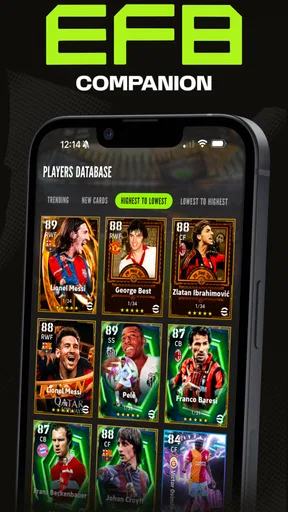
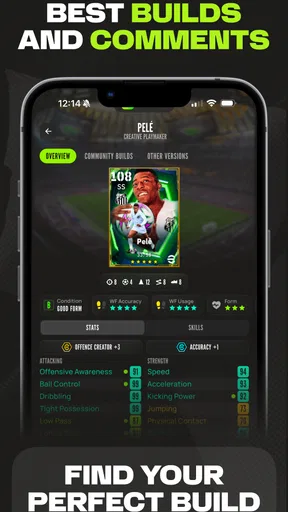
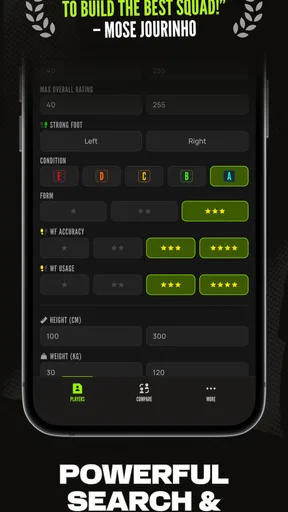
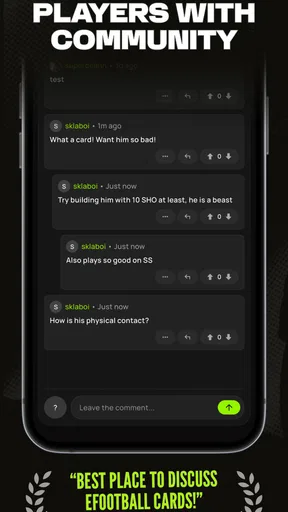
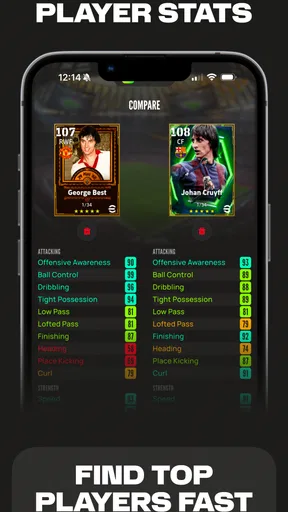
Our Review of eFootBase: DB & Community
 Analysis by Appyee
I spent time with eFootBase: DB & Community as a sports companion for eFootball fans, and my first impression was that it is most useful when I treat it as a reference tool rather than as a replacement for the game itself. Its purpose is to bring player and community information into one place, which can save a lot of back-and-forth between ordinary search results, social posts, and separate discussion spaces. The app is free to install, although optional purchases range from $1.99 to $24.99 per item.
That focus makes the app appealing to a very specific audience. If you regularly compare eFootball players, look for community discussion, or want a dedicated place to organize your football-game research, it has a clear reason to exist. If you only play occasionally and never check databases or community opinions, it may feel like more equipment than you need. My experience also suggests that its value depends heavily on how comfortably you can read, browse, and filter information on a mobile screen.
How eFootBase handles reading and navigation
The biggest accessibility question for a database-and-community app is not whether it contains a lot of information, but whether I can reach the information I need without getting lost. eFootBase: DB & Community is built around the habits of users who want to inspect details, compare options, and follow conversations. That is a different experience from opening a simple sports score app, where the important result is usually visible immediately.
I found it helpful to approach the app with a task in mind. For example, instead of casually opening every section, I would decide whether I was checking a player, exploring community advice, or researching a possible squad choice. This small change made the experience feel more controlled. A database can become tiring when I browse without a question, especially if several entries look similar and I am trying to remember why I opened each one.
For readers who prefer large, uncomplicated interfaces, the amount of information may be the first challenge. Football databases naturally rely on labels, numbers, short descriptions, icons, and repeated comparison points. That density is useful for experienced eFootball users, but it can make the screen feel busy for someone new to this kind of companion app. I would not recommend judging it after only a quick glance at the home screen; the real test is whether the sections you use most often become familiar after a few visits.
The community side adds another layer to navigation. A discussion area is more fluid than a fixed database because useful advice can sit beside casual opinions, repeated questions, or posts that only make sense during a particular in-game situation. I had to read with a little more judgment there. The database is the place I would begin when I want structured information; the community is better when I want context, practical opinions, or ideas from other players.
One useful habit is to separate discovery from decision-making. I might use community conversations to find a player or tactic worth investigating, then return to the database before acting on that suggestion. This two-step workflow is more reliable than accepting the most confident comment as fact. It also reduces the risk of spending time comparing options that do not fit the way I actually play.
The app comes from Wild Pluto, and its audience is clear from the combination of database and community functions. The store summary presents it as an all-in-one companion for eFB, while the short description identifies it as eFootBase. In practical terms, that means I see it as a specialist tool for people already familiar with the eFootball ecosystem, not as a general football news application.
Reading comfort matters more than the feature list
For users with reduced vision, reading fatigue, or difficulty distinguishing small interface elements, a dense reference app can demand more effort than expected. I would use the device’s own display settings, text-size options, and contrast preferences where available, then check whether the most important labels remain comfortable to read. Enlarging text can help in some situations, but it may also make a crowded screen require more scrolling. That is a real trade-off: better legibility can mean slower comparison.
I also recommend avoiding rushed browsing. When I am selecting a player or checking a community recommendation between matches, I am more likely to overlook a label or confuse one entry with another. A calmer review process works better: identify the category, inspect the relevant details, and only then make a decision. This is especially useful for users who process information more slowly or who find rapid visual scanning tiring.
People who rely on screen readers should test the app directly with their preferred assistive setup before making it part of an important routine. I would pay attention to whether controls are announced clearly, whether icons have meaningful labels, and whether database details are read in a sensible order. I cannot treat a visually organized screen as automatically accessible to non-visual users. The same information may be easy to see but awkward to hear if labels and values are not presented logically.
That distinction also matters for users with reading or attention difficulties. The community section may be easier to approach in short sessions than as a long scrolling read. I would save a simple personal rule: read one discussion for a specific question, extract the useful point, and leave the rest for later. This prevents the app from turning into an endless stream of opinions when what I really need is one clear answer.
Motor, sensory, and situational use
Motor access is often overlooked in sports companion apps because they do not require the same rapid controls as a football game. Still, browsing can involve repeated taps, scrolling, back navigation, and precise selection of small interface targets. Anyone with tremors, limited reach, joint pain, or one-handed use needs to notice how much repetition a normal research session creates.
My practical advice is to use the app in short, deliberate stages instead of trying to complete a long comparison in one sitting. I would start with the player or topic that matters most, record the conclusion mentally or elsewhere, and then continue only if another comparison is genuinely necessary. This is not just a comfort tip. It also improves accuracy because fatigue makes it easier to tap the wrong entry or lose track of the original question.
One-handed use can be convenient when I am holding a controller, carrying something, or sitting in an awkward position, but it can also expose the limits of a screen-heavy database. If the information I need is spread across several views, I may have to reposition the phone repeatedly. Users with limited dexterity should consider whether their usual device size and grip make this comfortable. A larger screen may improve reading while making edge-to-edge tapping harder; a smaller phone may be easier to hold but less forgiving for dense comparisons.
Sensory considerations go beyond vision. Community content can be mentally noisy because different users may recommend conflicting choices with equal confidence. For people who are sensitive to information overload, the best approach is to treat the community as a source of leads, not as a stream that must be consumed completely. I found that the app works better when I decide in advance what kind of answer I am looking for.
There is also a useful distinction between quiet research and live play. During a match or while quickly changing a squad, I would not want to depend on a database app for a decision that requires concentration. Opening another reference screen can divide attention at exactly the wrong moment. eFootBase is more suitable before a session, after a match, or during a planned break, when I can read carefully without competing with gameplay.
A realistic everyday scenario is preparing a squad on a short commute. I might have a few minutes before arriving, so I open the app to investigate a player I have seen mentioned by the community. I first look for structured information, then compare that with the reasons other users give for choosing the player. If the screen feels too dense in motion or the connection is inconvenient, I stop rather than forcing a decision. That makes the app useful without allowing it to control the whole routine.
Who benefits from this kind of companion?
The strongest audience is an engaged eFootball player who enjoys making informed choices. That could be someone who likes comparing players, someone who wants community opinions before changing a squad, or someone who prefers a dedicated football-game reference instead of general web searches. The app can also suit users who enjoy learning from other players but want a more focused environment than a broad social network.
Newcomers may need more patience. A specialist database assumes that the user already understands at least some of the language and context around eFootball. I would not install it expecting a gentle tutorial that explains every concept from the beginning. Its usefulness grows as I know what I am searching for, which means a beginner may get more from it after spending time with the game itself.
On the other hand, highly competitive users should be careful about relying on any single community opinion. A popular recommendation may fit one play style and fail for another. I would compare the underlying player information with my own needs, available options, and preferred approach. The app is most valuable as a decision aid, not as an authority that removes the need for judgment.
People who want football news, live scores, or broad coverage of real-world leagues should look elsewhere. This is not how I would use eFootBase. Its identity is tied to eFootball and its player community, so choosing it for unrelated sports information would create the wrong expectations.
What the free model means in practice
The app is free, which makes it easy to try without committing money at the start. Optional in-app purchases are available, with individual items priced from $1.99 to $24.99. I would explore the everyday workflow before considering any purchase. The important question is not whether an extra option sounds useful, but whether it removes a repeated frustration in the way I personally use the app.
For accessibility-minded users, this is especially important. A paid option should not be assumed to solve every navigation or readability issue. I would first check whether the free experience is comfortable with my device settings, input method, and preferred browsing pace. If the basic workflow already feels tiring, spending more may not address the underlying barrier.
The app has an average rating of 4.6 from around 14 thousand ratings, and it has passed half a million installs. Those figures suggest that it has found a substantial audience, but they should not replace personal testing. A rating reflects many different phones, habits, expectations, and levels of eFootball experience. Someone who wants a quick, uncluttered tool may feel differently from a dedicated database user who values depth and community activity.
Its Teen content rating is also worth keeping in mind for families. I would not present the community area as automatically suitable for every younger user simply because the app is sports-related. Community spaces depend on user contributions, so parents and guardians should make their own decision about whether the tone and interaction style fit the person using the phone.
Remaining barriers and my inclusive verdict
The main barrier I experienced is the natural complexity of combining a database with a community. That combination is powerful, but it asks me to switch between structured facts and subjective discussion. Users who need a very predictable, low-distraction interface may find the experience demanding. The app is also less suitable for anyone who wants instant answers without reading, comparing, or interpreting context.
Another barrier is the difference between visible organization and genuinely flexible access. A screen can look neat to one person and still be difficult for someone using magnification, a screen reader, alternative input, or a different text size. I would encourage users with specific access needs to test their normal setup early, rather than assuming that a high rating guarantees a comfortable experience for them.
There is a further trade-off between convenience and concentration. Having a dedicated companion means I can keep research in one place, but it also gives me more reasons to check details, read opinions, and second-guess decisions. I found the app healthiest when I used it to answer a question, not when I opened it simply because I was bored. That boundary is particularly helpful for users who find open-ended feeds distracting.
The current version is 1.9.4, and the minimum operating-system requirement is Android 7.0. That makes the app relevant to people using older Android hardware, although compatibility alone does not guarantee that every older phone will offer the most comfortable reading or touch experience. Screen size, display quality, performance, and personal settings still matter when an app presents a lot of football information.
My final view is positive but specific: eFootBase: DB & Community is worth trying if you want a focused eFootball reference combined with player discussion. I like the way it can support a repeatable workflow—discover an idea in the community, inspect it more carefully in the database, and then decide based on my own style rather than impulse. That is more useful to me than simply scrolling through isolated recommendations.
I would skip it if I want real-world sports coverage, a simple score screen, or a companion that requires almost no reading. I would also be cautious if dense interfaces, rapid scrolling, or community-heavy content regularly create fatigue, unless my device settings and browsing habits make the experience manageable. The best reason to use it is not that it puts everything in one place, but that it can turn scattered eFootball research into a more deliberate decision process.
For me, that makes Wild Pluto’s app a capable specialist tool rather than an essential download for every football fan. Its inclusive value comes from letting different users choose their own pace and purpose, but the app still demands attention, interpretation, and a comfortable way to navigate information. If those conditions match how you play, it can become a practical part of your eFootball routine.
Verdict
Strengths of eFootBase: DB & Community
- Detailed player databases help compare ratings, stats, and profiles quickly.
- Community features make it easy to follow discussions and share opinions.
- Useful filters simplify finding players by position, league, club, or rating.
- Regular football content can keep the app relevant throughout the season.
- A practical companion for planning squads and researching transfer targets.
Limitations of eFootBase: DB & Community
- Some database information may become outdated after transfers or updates.
- Community content quality can vary depending on user contributions.
- The interface may feel crowded when browsing many filters and categories.
- Advanced features may require an account or additional permissions.
- Ads or promotional content could interrupt browsing for some users.
Similar Picks in This Category
View All
BeSoccer: Soccer Live Score
BeSoccer apps4.3

Cricbuzz - Live Cricket Scores
Cricbuzz.com3.7

NFL
NFL Enterprises LLC2.4

Da Fit
MO YOUNG LIMITED3.6

ESPN
Disney4.5

LiveScore: Live Sports Scores
LiveScore Limited4.5
Frequently Asked Questions
What is eFootBase: DB & Community used for?
eFootBase: DB & Community is designed for players who want to explore and manage information related to the eFootball game series. It provides access to a detailed database of players, teams, ratings, skills, positions, and other useful statistics. The community features can also help users discuss tactics, compare cards, share opinions, and keep up with developments surrounding the game.
Does eFootBase: DB & Community include the official eFootball game?
No. eFootBase: DB & Community is a companion and information app, not the official eFootball game itself. It does not replace the game client or allow you to play matches directly from the application. You should download eFootball separately through the official app store if you want to play. This app is mainly intended for research, planning squads, comparing players, and interacting with other fans.
Is eFootBase: DB & Community useful for building an eFootball squad?
Yes, the database can be useful when planning a squad or deciding which players may fit your preferred style of play. You can review attributes, positions, abilities, player types, and other details before making decisions. However, database information should be treated as a planning aid rather than a guarantee of in-game performance, since team tactics, player progression, updates, and personal gameplay can affect the final results.
Does the information in eFootBase: DB & Community stay updated?
The app is intended to provide current eFootball-related database and community information, but updates may not always appear immediately after an official game change. Player ratings, cards, events, skills, and availability can be modified by the game developer. Before relying on a specific statistic or player detail, it is sensible to check the app’s latest update and compare important information with official eFootball announcements.
Is eFootBase: DB & Community free to download, and are there any privacy considerations?
Availability and pricing may depend on your device, region, and the version distributed through the relevant app store. Some features may be free, while advertising, optional purchases, or account-based community functions could be present. Before installing, review the store listing for current permissions, in-app purchase details, and the developer’s privacy policy. Avoid sharing unnecessary personal information in public community discussions.
